Services
Services are persistent, stateful companions to stateless components.
Workloads are composed of components and optionally a service. While services are Wasm components, they serve a fundamentally different role than a typical component in the architecture of an application.
A service is essentially the "localhost" for a workload, acting as a persistent, stateful companion to stateless components, and providing capabilities that don't make sense for ephemeral invocations. Services are an important primitive for building complete applications that require both stateless, scalable components and stateful, long-running processes.
By isolating services at the workload level and providing them with TCP capabilities, wasmCloud enables patterns like connection pooling, protocol bridging, and cron scheduling—all while maintaining strong security boundaries.
Execution model
wasmCloud drives a service through its trigger-service execution model: one long-lived component instance is pinned under a single store, and each host-invoked export the service declares becomes an ingress: a channel the host uses to deliver external HTTP requests, messaging deliveries, or capability calls to that same instance. Inbound invocations run as concurrent per-invocation tasks alongside any wasi:cli/run background loop, sharing in-memory state (pools, caches, counters, connections) across every handler and background task.
See Trigger services for the full ingress catalog and supervision behavior.
Service as localhost
Services can open TCP sockets, listen on ports for incoming connections, and act as 127.0.0.1/localhost within the workload boundary. Services run continuously for the lifetime of the workload.
When a component opens a TCP connection to 127.0.0.1 or localhost, it connects to the service within its own workload—not to the underlying host OS. This creates a strong isolation boundary.
Multiple workloads on the same wasmCloud host can each have services listening on the same port (e.g., port 8080) without conflicts, as each workload has its own isolated network namespace.
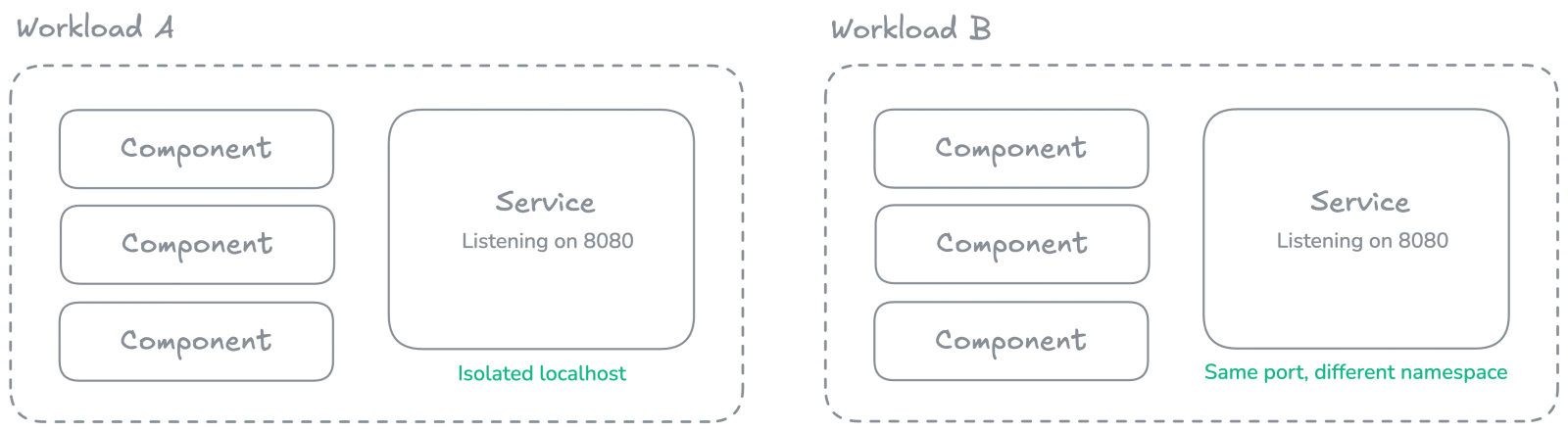
Communication flow
Services can call interfaces exported by components:
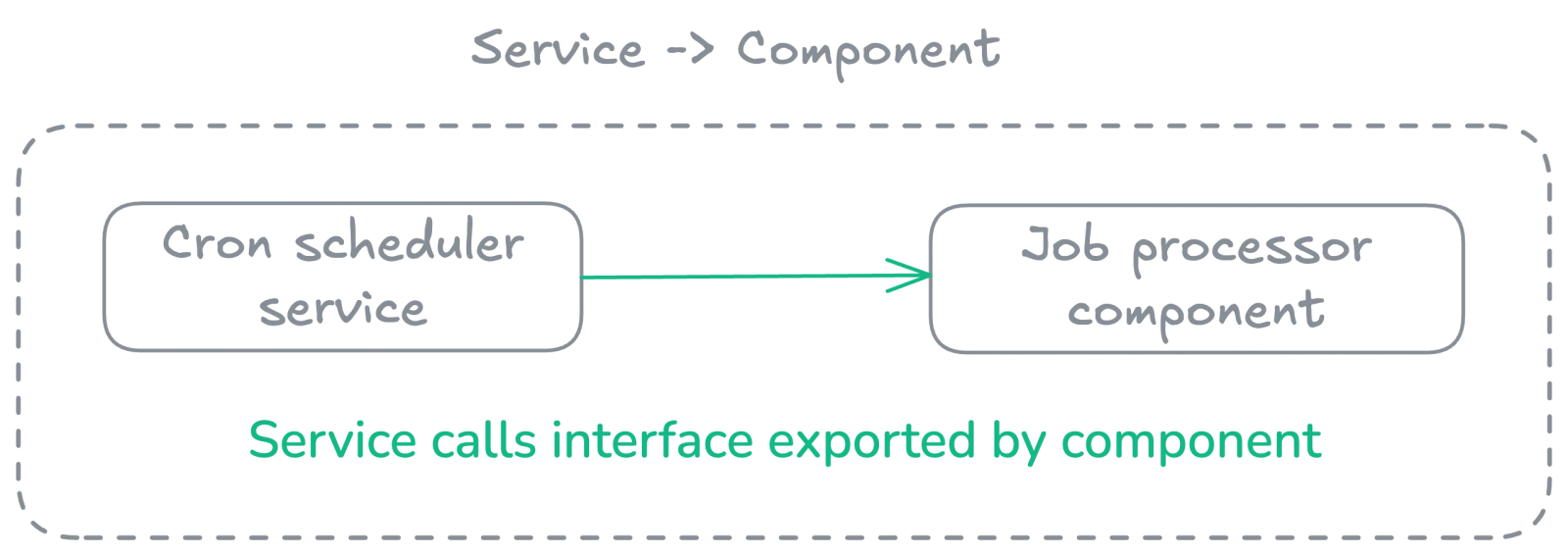
Components cannot call into the service via WIT interfaces.
However, components can connect to TCP ports the service is listening on:
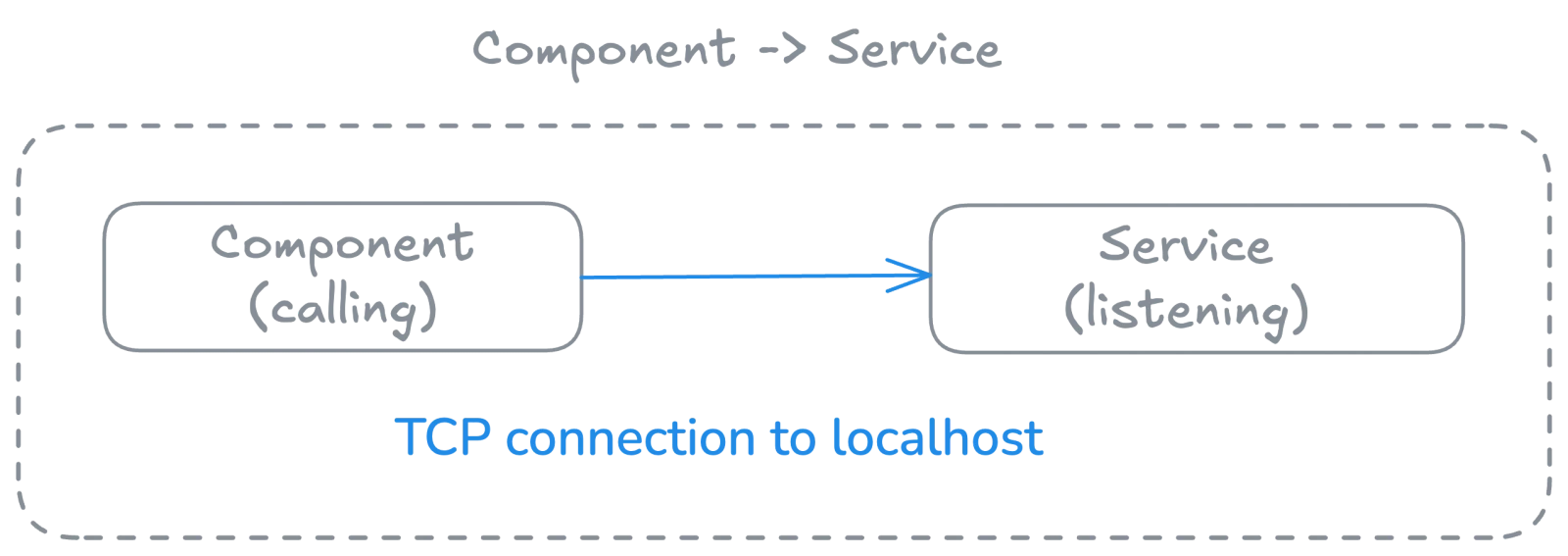
How services use interfaces
Services are not limited to TCP—they can use your own custom interfaces defined in WIT. The wasi:sockets TCP bind permission is simply a special capability that services receive, enabling them to act as TCP listeners within the workload boundary.
Export requirement
A service must export wasi:cli/run (the standard run function) or exactly one WIT interface. This is how the runtime identifies the service's entry point. For example, a service could export wasi:cli/run to act as a long-running process with a main function, or it could export a single custom interface.
A service may additionally co-export a host-invoked interface (wasi:http/handler@0.3 or, as of wasmCloud 2.8.0, wasmcloud:messaging/handler@0.3.0) to wire up the corresponding ingress. The co-exported handler runs on the same pinned instance as wasi:cli/run, so long-running work in the run loop and per-invocation handler work share state.
Imports and host plugins
Services can import any host interface that a plugin provides. The host_interfaces field on a workload lists WIT interfaces that need to be resolved by host plugins. When the runtime binds plugins, it checks which WIT interfaces the service's world needs and binds matching plugins—treating services the same as components in this regard.
The special treatment services receive for wasi:sockets only affects whether TCP bind is allowed: services can bind to loopback and unspecified addresses for TCP, while regular components cannot. Beyond this, services interact with host plugins in the same way as components.
Custom interface exports
Services can export arbitrary WIT interfaces. The only constraint is the validation described above: the service must export wasi:cli/run or exactly one interface, so that the runtime knows the entry point. This means you can build services that expose domain-specific functionality through a custom WIT interface.
Use cases
For instructions on how to develop services, see the Wasm Shell (wash) Developer Guide.
Connection pooling
Services are ideal for managing persistent connections to databases or external services. Components don't pay the overhead of establishing new TCP connections per invocation, and this approach enables efficient connection reuse across all component invocations.
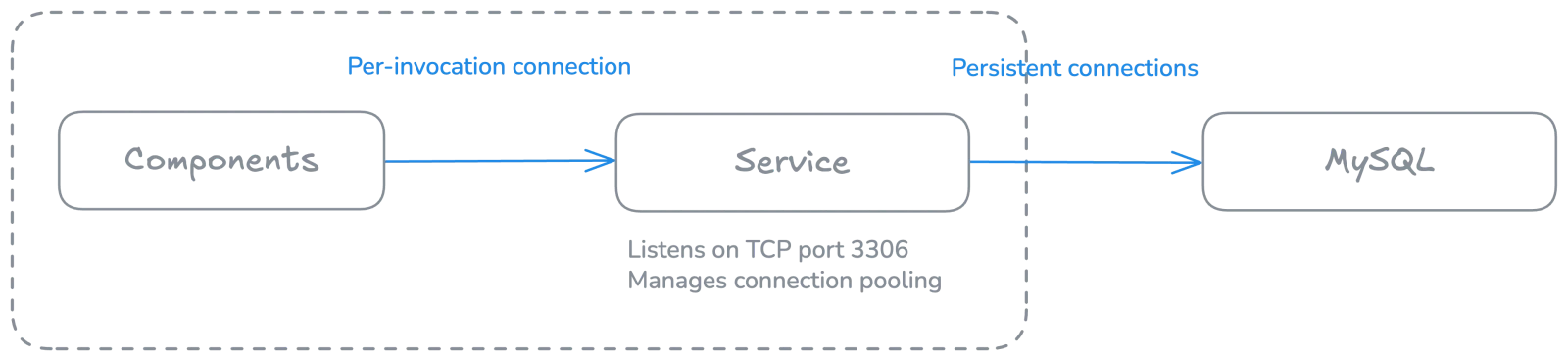
Cron or scheduled tasks
Implement cron-like functionality by having a service periodically call component interfaces:
wit_bindgen::generate!({
    world: "service"
});

// NOTE: This example is a `tokio::main` to show how you can use an async main, but
// it can just be a synchronous main as well.
#[tokio::main(flavor = "current_thread")]
async fn main() {
    eprintln!("Starting cron-service with 1 second intervals...");
    loop {
        tokio::time::sleep(std::time::Duration::from_secs(1)).await;
        let _ = wasmcloud::example::cron::invoke();
    }
}
Stateful in-memory cache
Run a small key-value store that maintains state across invocations. Connections are extremely fast, since they use virtual pipes within the runtime rather than "real" TCP/IP.

TCP server applications
Build TCP server applications directly in Wasm, such as the following TCP echo server that accepts incoming connections, echoes back any data received, and runs continuously for the workload's lifetime:
use wstd::io;
use wstd::iter::AsyncIterator;
use wstd::net::TcpListener;

#[wstd::main]
async fn main() -> io::Result<()> {
    let listener = TcpListener::bind("127.0.0.1:7070").await?;
    println!("Listening on {}", listener.local_addr()?);
    println!("type `nc localhost 7070` to create a TCP client");

    let mut incoming = listener.incoming();
    while let Some(stream) = incoming.next().await {
        let stream = stream?;
        println!("Accepted from: {}", stream.peer_addr()?);
        wstd::runtime::spawn(async move {
            // if echo copy fails, we can ignore it.
            let _ = io::copy(&stream, &stream).await;
        })
        .detach();
    }
    Ok(())
}
Considerations
When developing applications with services, it is important to consider the following:
- One service per workload: Currently, workloads support a single service.
- Export constraint: Services must export
wasi:cli/runor exactly one WIT interface, optionally alongside a host-invoked handler that wires up an ingress. - One-way communication: Components cannot call service exports via WIT (but can use TCP).
- Memory usage: Services maintain state, so they consume memory continuously.
- WASI target: Services that use the HTTP ingress compile against WASI P3 (
wasi:cli/run@0.3.0+wasi:http/handler@0.3.0); the messaging ingress useswasmcloud:messaging/handler@0.3.0as of wasmCloud 2.8.0. Services that don't co-export a host-invoked handler can target P2 or P3 to match their world's other imports. A service reached by a native plugin's dispatch (since 2.9.0) must also target WASI P3, and it stays up afterwasi:cli/runreturns so it can keep receiving dispatches. - Async runtime: Can use single-threaded async runtimes (e.g., Tokio with single-threaded executor).
- Restarts: On a guest trap, the runtime re-instantiates the service within a bounded restart budget; see Trigger services supervision.
- Isolation: Service network operations are isolated within the workload boundary.
As wasmCloud v2 moves from WASI P2 to P3 and beyond, services make it possible to bridge between TCP and WIT (WebAssembly Interface Types) for protocols that don't have native WASI support yet.
Keep reading
- Continue to learn more about interfaces.
- Learn more about services' role within a component—and how to decide when you should use components or services—in Workloads.
- Choosing between a plugin and a service? See Plugin or Service?.
- Learn how to develop services in the Wasm Shell Developer Guide.
- Building a service that provides a host capability to other workloads? See Host component plugins and the authoring guide.